AI Document Migration: 50+ Documents in Under an Hour
Last week, a client came to me with a problem that made my stomach sink. They needed to migrate 57 process documents from their old wiki format to a new standardized template. Each document would take about 20 minutes to reformat manually. That's 19 hours of mind-numbing copy-paste work.
Instead, we automated the entire process using AI and finished everything in 47 minutes.
This guide shows you exactly how to do it yourself using free tools like Google AI Studio. No coding required, just copy-paste prompts.
Why Manual Documentation Migration Is a Productivity Killer
Every growing company hits this wall eventually. You start with simple docs in Google Drive or Confluence. Then you realize you need better structure. Maybe you're implementing ISO compliance, or your team can't find anything anymore.
The traditional solution? Assign an intern or junior employee to manually reformat everything. But this approach:
- Takes weeks or months to complete
- Introduces human errors and inconsistencies
- Demoralizes whoever gets stuck with the task
- Often gets abandoned halfway through
The industry revenue of document preparation services in the US is estimated to reach $4.64 billion in 2024, yet 46% of employees said that they "sometimes or almost always" struggle to find the information they need to carry out their job. This disconnect shows why proper document migration is critical for business operations.
There's a better way.

AI-powered document processing transforms how businesses handle large-scale data migration and analysis.
The Three-Phase AI Migration Process
Our approach follows a simple principle: teach the AI once, validate it works, then let it run. Here's the complete workflow:
Phase 1: Build the Blueprint (20 minutes)
- Analyze your old document structure
- Define your new template format
- Create mapping instructions
Phase 2: Test & Validate (15 minutes)
- Run 2-3 sample documents
- Check the output quality
- Refine if needed
Phase 3: Bulk Process (10-15 minutes)
- Process remaining documents in batches
- Review and deploy
Let me walk you through each step.
Phase 1: Building Your Migration Blueprint
Step 1: Extract Your Current Document Structure
First, we need to teach the AI what your existing documents look like. Open Google AI Studio (it's free) and use this prompt:
Analyze the structure of the following documents and generate a single,
normalized JSON Schema that describes their common format. The schema
must include type, properties, and required fields.

[Paste 3-5 of your current documents here]
The AI will analyze your documents and create a technical blueprint. For example, if your old docs have a title, author, date, and list of steps, you'll get something like:
{
  "type": "object",
  "properties": {
    "title": {"type": "string"},
    "author": {"type": "string"},
    "last_updated": {"type": "string"},
    "steps": {"type": "array", "items": {"type": "string"}}
  },
  "required": ["title", "steps"]
}
Save this output. It's your "old blueprint."
Step 2: Define Your New Template Structure
Next, show the AI your new documentation template:
Here is my new documentation template. Generate a valid JSON Schema
that describes its format.

New Template:
## [Process Title]

**Process Owner:** [Owner Name]

**Why This Matters:**
[Explain the business impact]

**Official Documentation:**
[Link to vendor docs]

**Our Internal Steps:**
- [Custom step 1]
- [Custom step 2]
The AI will create your "new blueprint" that might look like:
{
  "type": "object",
  "properties": {
    "process_title": {"type": "string"},
    "process_owner": {"type": "string"},
    "why_this_matters": {"type": "string"},
    "official_documentation": {"type": "string"},
    "internal_steps": {"type": "array", "items": {"type": "string"}}
  }
}
Step 3: Create the Mapping Rules
Now we tell the AI how to move data from old to new:
Create a JSON mapping between these schemas:

Old fields: title, author, last_updated, steps
New fields: process_title, process_owner, why_this_matters,
            official_documentation, internal_steps
The AI generates mapping rules like:
{
  "process_title": "title",
  "process_owner": "author",
  "internal_steps": "steps"
}
Phase 2: Testing Your Migration Process
This is the critical step most people skip. We'll test the complete process on a few documents before running all 50+.
Step 4: The Master Migration Prompt
Combine everything into one powerful prompt:
You are a documentation migration expert. For each document provided:

Step A: Extract data using the Old Schema
Step B: Transform using the New Schema and Mapping Rules
Step C: Generate the final formatted document

Schemas and Rules:
[Insert your schemas and mapping from Phase 1]

Additional Instructions:
- For "why_this_matters", explain the business impact
- For "official_documentation", add relevant vendor links
- Preserve all important details from the original

Process these documents:
[Paste 2-3 test documents]
Run this prompt and carefully review the output. Does it look right? Are important details preserved? Is the formatting correct?
If yes, you're ready for bulk processing. If not, adjust your instructions and test again.
Phase 3: Bulk Processing at Scale
Step 5: Process All Documents
Once your test documents look perfect, use the same master prompt to process the rest in batches of 5-10 documents.
Pro tip: Google AI Studio lets you save prompts. Save your perfected master prompt as a template for future migrations.
Step 6: Quality Check and Deploy
Even with AI automation, do a quick review:
- Scan for any obvious formatting issues
- Verify critical information transferred correctly
- Check that links and references work
Real-World Results
Here's what this process achieved for three recent implementations:
FinTech Startup (62 documents):
- Manual estimate: 20 hours
- AI automation: 52 minutes
- Error rate: <2%
Healthcare SaaS (43 documents):
- Manual estimate: 14 hours
- AI automation: 38 minutes
- Added compliance fields during migration
E-commerce Platform (91 documents):
- Manual estimate: 30 hours
- AI automation: 1 hour 15 minutes
- Standardized inconsistent formats
These results align with industry trends. Organizations see an average ROI of 200–300% within the first year of implementing document processing automation. Companies report an average reduction of 60–70% in document processing time after adopting IDP solutions.

Modern businesses leverage AI-powered automation to achieve dramatic time savings and cost reductions.
Advanced Tips for Complex Migrations
Handling Multiple Document Types:
Create separate schemas for different document categories (procedures, policies, guidelines) and run them in separate batches.
Adding New Information:
The AI can enrich documents during migration. For example, adding compliance checkboxes, risk assessments, or approval workflows to existing processes.
Preserving Special Formatting:
If your documents contain tables, images, or special formatting, add specific instructions to your master prompt to handle these elements.
Common Pitfalls to Avoid
Starting Too Big: Always test with 2-3 documents first. It's tempting to run all 50 at once, but small tests catch issues early.
Ignoring Edge Cases: That one weird document with a different format? Handle it separately rather than complicating your main process.
Over-Engineering: Keep your schemas simple. The AI works best with clear, straightforward structures.
Beyond Basic Migration: What's Possible
Once you master this process, you can:
- Auto-generate summaries during migration
- Extract action items into separate task lists
- Create cross-references between related documents
- Generate multiple output formats (wiki, PDF, markdown)
This connects directly to broader finance automation solutions that can transform your entire document workflow.
The Business Impact
Manual documentation work is expensive. A mid-level employee spending 20 hours on migration costs roughly $1,000-1,500 in salary alone. That's before considering the opportunity cost of not doing higher-value work.
Generative AI companies boast a 3.7x ROI from their initial investment. Top Performers: Generative AI implementations today average a 10.3 times return on your initial investment. AI automation reduces this to under an hour of oversight time. The ROI is immediate.
Getting Started Today
You can implement this process right now:
- Open Google AI Studio (free account)
- Gather 3-5 sample documents
- Follow the prompts in this guide
- Test on a small batch
- Scale to your full document set
The entire process takes less time than manually converting 3-4 documents.
Taking It Further with Starter Stack AI
While Google AI Studio works great for one-off migrations, companies processing documents regularly need more robust solutions. At Starter Stack AI, we've built this same migration logic into automated workflows that:
- Run continuously as new documents arrive
- Integrate with your existing tools (Confluence, SharePoint, Google Workspace)
- Handle complex multi-step transformations
- Maintain audit trails for compliance
Our clients typically see 90% reduction in documentation processing time within the first week. This approach extends beyond simple migration to comprehensive financial reporting automation and automated investment reporting.
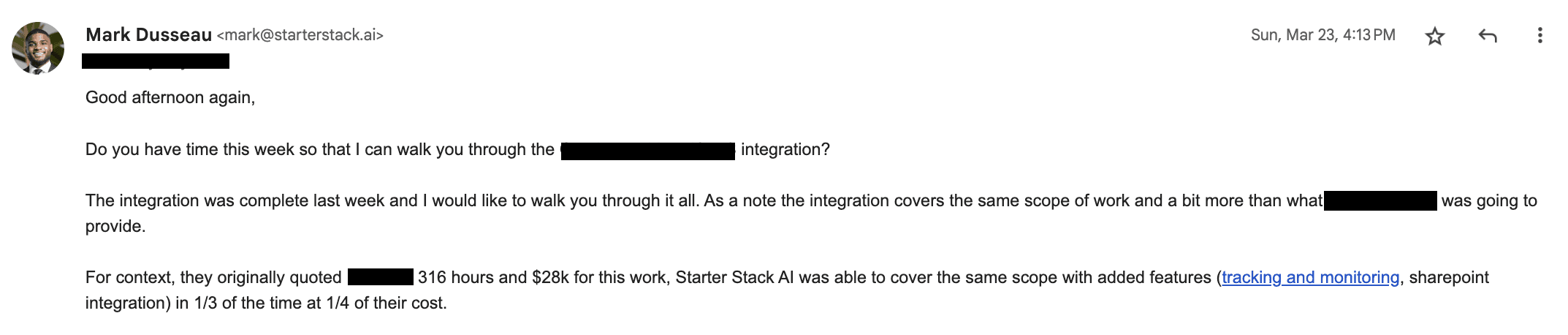
Real client results: 316 hours of work completed in one-third the time at one-quarter the cost.
For businesses looking to scale their operations, understanding why small businesses need AI-powered automation is crucial for staying competitive in today's market.
FAQ
Q: What if my documents don't follow a consistent format?
A: Group similar documents together and create separate schemas for each group. The AI handles variations within each group surprisingly well.
Q: Can this work with PDFs or scanned documents?
A: Yes, but you'll need to extract the text first. Google AI Studio can process text from PDFs, or you can use OCR tools for scanned documents.
Q: How accurate is the AI conversion?
A: With proper schemas and testing, we typically see 95-98% accuracy. The structured approach eliminates most errors. Automated document processing reduces human error rates by up to 90%, compared to manual data entry.
Q: What about sensitive or confidential information?
A: For sensitive documents, consider using enterprise AI tools with better security controls, or partner with Starter Stack AI for secure, compliant processing.
Q: Can I use this for other types of content migration?
A: Absolutely. This same process works for migrating blog posts, knowledge base articles, customer communications, and more. It's particularly effective for lending operations AI and private equity AI applications.
Q: How does Starter Stack AI's solution differ from DIY approaches?
A: We provide enterprise-grade automation that runs continuously, integrates with your existing systems, and includes human-in-the-loop validation for critical documents. Plus, our platform improves accuracy over time through machine learning. Our AI agent capabilities extend far beyond simple document migration to comprehensive workflow automation.
Ready to eliminate manual documentation work forever? The prompts are above, the tools are free, and your 19 hours of saved time are waiting.
Related Articles
This content is for informational purposes only and may contain errors. Please contact us to verify important details.